An open-source desktop application built for photographers who work against deadlines. Deadlyne combines high-speed photo culling, code replacements, IPTC captioning and FTP delivery into one streamlined workflow. Designed and developed as a free alternative to traditional photo-editing workflow software.

Client
Deadlyne
Role
Product Design & Development
Scope
Product Strategy, UI/UX Design, Desktop App Development, Brand Identity, Workflow Automation
Built for photographers who understand deadlines
Deadlyne is a free, open-source desktop application designed to simplify one of the most demanding parts of professional photography: getting images from the camera to the people who need them.
As a sports photographer, I've spent countless hours culling through thousands of RAW images, writing captions, applying metadata and delivering photographs while games are still being played.
I built Deadlyne to bring those essential tools together in one application.
Combining high-speed image culling, code replacements, IPTC metadata and FTP delivery, Deadlyne eliminates the need to constantly switch between applications during time-sensitive assignments.
Built for photographers, by a photographer who understands deadlines.
The problem
A fragmented workflow when every second counts.
Sports photographers regularly shoot thousands of images during a single assignment. The challenge isn't simply capturing the right moment. It's identifying, editing, captioning and delivering that moment before it loses its relevance.
Many photographers rely on several applications to accomplish these tasks. One handles image selection, another manages captions and code replacements, and additional software may be required to deliver the finished images.
Every additional step introduces friction into a workflow where speed matters.
I wanted to build an alternative that brought these tools together without sacrificing the performance and control professional photographers expect.
The goal wasn't to introduce another complicated piece of software. It was to eliminate unnecessary steps between capturing an image and delivering it.
The approach
One application. One continuous workflow.
I approached Deadlyne as both a designer and a photographer, using my own experiences working on the sidelines to inform the product's functionality and interface.
Every feature needed to serve a practical purpose.
Rather than designing around an extensive collection of menus and settings, I focused on the actions photographers perform most frequently: importing images, reviewing photographs, identifying selections, writing captions and delivering files.
The application brings these tools into a unified workspace, allowing photographers to move between different stages of an assignment without leaving their primary workflow.
The result is a desktop experience built around clarity, speed and direct access to the tools that matter.
High-speed photo culling
Find the moment. Skip the unnecessary steps.
Photo culling is one of the most repetitive parts of a photographer's workflow, particularly when covering live sports.
Deadlyne is designed around quickly reviewing large collections of RAW images, making selections and moving through assignments without unnecessary interruptions.
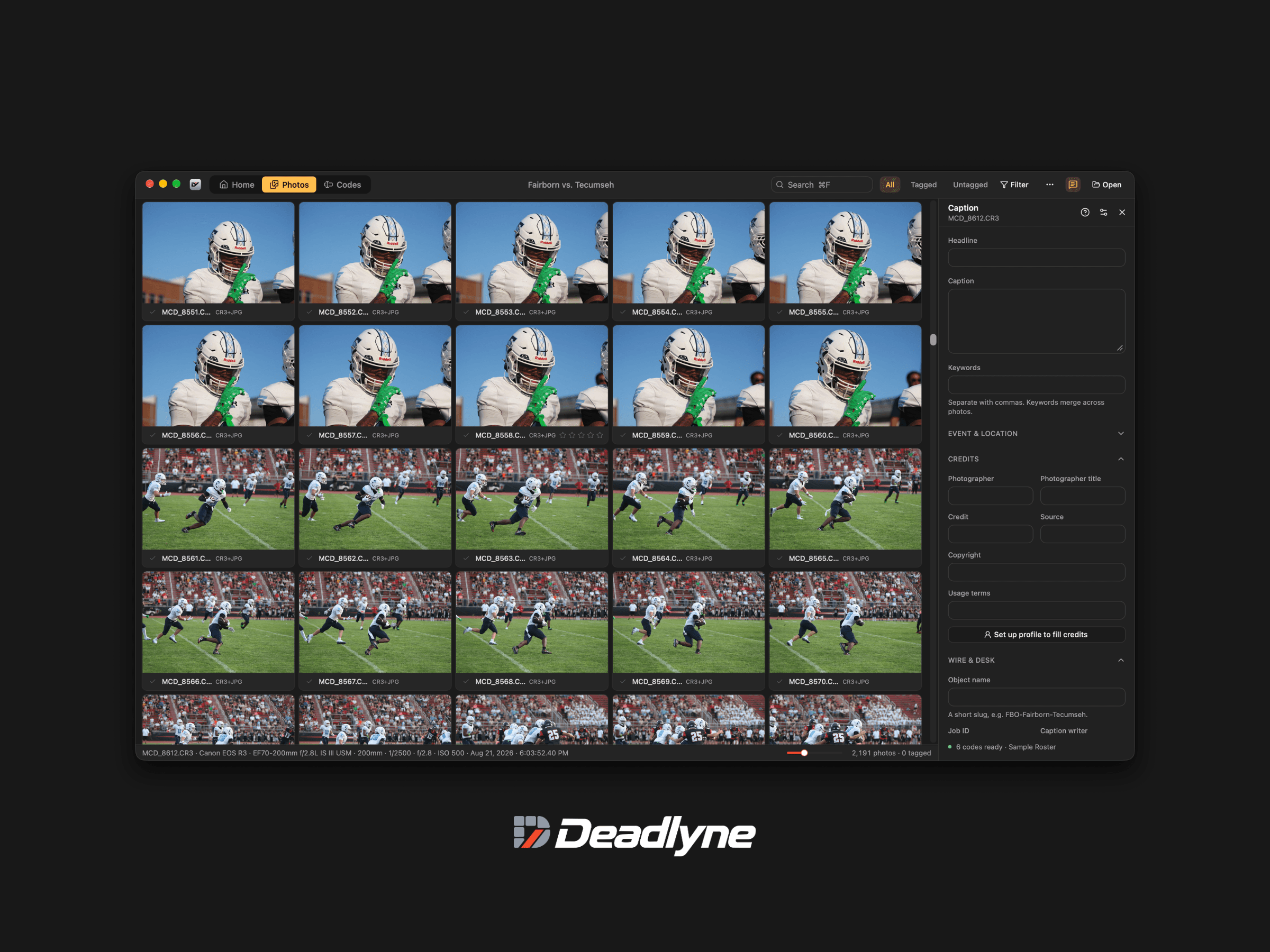
The interface places photography at the center of the experience. A dense image grid makes it possible to review an entire assignment, while visual indicators help photographers identify selected photographs and track their progress.
I intentionally kept the interface dark and visually restrained, allowing the photographs themselves to remain the primary focus.
Controls are organized around the actions photographers use most frequently rather than competing for attention.
Captioning without compromise
Get the details right, without slowing down.
Professional photography requires more than selecting a great image. Accurate captions, credits and metadata are essential, particularly for editorial and wire-service delivery.
Deadlyne includes an integrated IPTC captioning workspace that allows photographers to manage this information without switching applications.
The interface provides dedicated fields for headlines, captions, keywords, photographer credits, copyright information and additional editorial metadata.
These tools are organized into clearly defined sections, keeping the interface approachable while allowing photographers to access more detailed information when necessary.
By integrating captioning directly into the photo management experience, Deadlyne helps reduce the friction between selecting an image and preparing it for delivery.
Code replacements
Less typing. More time behind the camera.
Writing accurate captions during live sporting events can become repetitive, especially when identifying multiple athletes, teams and locations across hundreds of images.
Code replacements allow photographers to transform short identifiers into complete names or other predefined information, reducing the amount of manual typing required.
Deadlyne incorporates code replacements directly into its workflow, bringing this essential photography tool together with image selection and IPTC captioning.
Instead of maintaining separate applications for different stages of an assignment, photographers can prepare their images and manage their captioning information in one place.
It's a small change to the workflow that can make a meaningful difference when working against a deadline.

Delivery built into the workflow
From the sidelines to the newsroom.
Getting an image ready is only half the job. It still needs to reach its destination.
Deadlyne includes FTP delivery functionality, allowing photographers to send photographs directly to configured servers without relying on a separate file-transfer application.
Integrating delivery into the same environment as photo selection and captioning creates a more continuous workflow, reducing unnecessary application switching.
For photographers covering live events, the goal is simple: spend less time managing software and more time delivering the moments that matter.
Designing the interface
Professional tools don't have to feel complicated.
One of my primary goals was to create an application that offered professional functionality without overwhelming photographers with unnecessary interface elements.
The design uses a dark, minimal visual system with subtle borders, carefully controlled spacing and clear information hierarchy.
A compact navigation system separates photography and code replacement workflows, while contextual panels provide access to additional functionality without disrupting the primary workspace.
Image thumbnails receive the majority of the available screen space, allowing photographers to prioritize their work rather than the surrounding interface.
Every component was designed with a practical purpose, from image selection indicators and metadata fields to navigation controls and delivery settings.
The result is an application that feels familiar to experienced photographers while remaining approachable for those developing their professional workflows.
Building the Deadlyne identity
A visual identity inspired by the deadline.
Deadlyne needed an identity that reflected the speed and precision of the application without relying on conventional photography symbols.
The visual direction combines bold, forward-leaning typography with a compact geometric symbol and a restrained color palette.
Near-black establishes the brand's foundation, while a vivid red-orange accent introduces energy and creates a recognizable visual signature.
The resulting identity complements the application's dark interface while remaining distinctive enough to function independently across digital platforms and future product applications.
Like the software itself, the identity is intentionally straightforward, designed to communicate its purpose without unnecessary decoration.
Free and open source
Professional tools should be accessible.
From the beginning, I wanted Deadlyne to be more than another subscription-based photography application.
The project is being developed as free, open-source software, making its functionality accessible without introducing another recurring expense into a photographer's workflow.
Opening the project also creates opportunities for other photographers and developers to contribute improvements, identify problems and help shape its future.
My goal is to build a tool informed by the people who actually use it, rather than introducing features disconnected from the demands of professional photography.
Deadlyne is an ongoing project, and its direction will continue to evolve as the application develops.
The outcome
Less time managing files. More time capturing moments.
Deadlyne brings together the essential tools photographers need to manage time-sensitive assignments in a single desktop application.
By combining high-speed photo culling, IPTC captioning, code replacements and FTP delivery, the product establishes a more connected workflow from image selection to final delivery.
Its interface prioritizes the photographs, its features reflect real-world editorial requirements, and its open-source approach creates a foundation for continued development.
For me, Deadlyne represents an opportunity to apply years of experience in photography, product design and software development to solve a problem I've encountered firsthand.
It's a product I'll continue developing alongside the photographers who use it.
Built for photographers, by a photographer who understands deadlines.
